Work

And now I'm spent

Music: 

Man, nothing shuts off my productivity spigot like a good old fashioned anxiety attack. I'm not sure what people don't understand about "I don't go outside".

I don't go to supermarkets, I don't go to convenience stores, or restaurants, or concerts or anywhere else I'm going to need to interact with other talking meat. I'll go to the dump, or datacenters or whatever. Places where all the other meat are Over There and aren't trying to have conversations with me. Very occasionally I will work myself up and go to lunch at a diner or whatever, but it's a lot of effort.

Fixed Tags:
xrayspx's picture

Cabling Peeves

Music: 

Jan Beta

Consider this a "Before" post for an upcoming weekend project I'll have to do. Traditionally that's what the Thanksgiving long weekend is for.

I'm a big believer in having relatively tidy cabling. There's definitely just masses of wires in my life. But if you have a solid base of sanely cable managed stuff it makes it pretty easy to just tidy up the important stuff and brush all the random knots of cables into a drawer because if they mattered they'd be cable managed.

xrayspx's picture

5 Minute Network Cable Walkthrough

Music: 

Romeo Void - S.O.S.

This is not a "general purpose" guide for people to learn how to make network cables. I'm sure there are better guides with better methods and videos and whatnot. This is not a technique super-guide. If you find it and it's useful, great!

K, so here's us putting an RJ-45 end on a CAT-6 cable.

Strip about 1.5-2 inches of jacket from the cable. In the world of pass-through connectors you're not really penalized anymore for making everything a bit "too long". It's easier the more slack you have.

xrayspx's picture

Project Planning

Music: 

I'm trying to lay out some projects that I want to do "when I have the time". I'm considering streaming / recording these as I go if anyone wants to see them and/or help live. I'm at least going to document all of this so it's available to anyone who needs it.

I'm going to update this page as more things come up and I start completing tasks.

  • Pimp my Atari ST
    • Get video working. I have an SC1224 which isn't /super/ reliable. I have a Checkpoint monitor that I'm trying to get working for color + mono. I need to get that thing figured out and order whatever I need to make it go
    • Get a BlueSCSI working as a novelty oversized hard drive with tons of partitions and everything on there. This will involve removing the RIFA caps and getting Len's ICD enclosure working and learning how to install drivers and stuff.
    • Get my ST talking to Linux machines over serial. This could either be the Pi inside the CheckPoint monitor, or ideally hooked up through the Avocent serial console switch so I could address other ports
    • Use the serial terminal to manage software transfers from my PC to ST eliminating using aging physical floppy disks and drives or new things like GoTek
    • Use this method to make images of Len's stuff and transfer to the PC. I think that will be the easiest way to archive these disks


  • NeXT Machine
    • Buy the replacement modern SoundBox card to get VGA output and eliminate the aging CRT
    • Build the AdaFruit project to use the NeXT non-ADB keyboard on a PC with USB
    • Use that knowledge to gauge how hard it might be to go the other direction? Using USB stuff on NeXT would be way more useful
    • Try to get the service manual for that printer or an equivalent Canon model


  • MiSTer Cabinet
    • Remove that front door. I keep banging my knees on this idiot door
    • While the cabinet is apart, extend all the ports from the TV inside with like pigtail connectors including power (C14 -> C15), HDMI and anything else like RF and stuff to hook up Ataris
xrayspx's picture

SMS is Dead

Music: 

Bash & Pop - Making Me Sick

This is by far the stupidest thing I've ever had to write.

For decades, IT has used pagers, and later SMS, to alert on outages and send notifications to stakeholders. This has been broken for some time by CloudFilter. Most (All?) US providers rate-limit access to SMS via email by filtering inbound mail through CloudFilter. This has resulted in me missing countless outage events. I'm not sure that my sites aren't even permanently blacklisted at this point. As far as I know there is no way to "opt out" of this, except in the case of Enterprise customers. We are not an Enterprise Customer. In fact if I get one pager event every 3 or 4 months that would surprise me. I'm not exactly "high volume". I do have a Business mobile account, but that evidently does not qualify me to opt out.

So...

I now have SMS emails being sent to my personal, non-work, email address. A cron job checks that folder for mail and if any exists, I use KDEConnect to send a "Find My Phone" alert to my phone. This isn't really ideal on any level:

  • KDEConnect uses an Alarm for the Find My Phone feature. I never realized this because I don't lose my phone. Makes total sense though since this means it doesn't respect Ringer or Alert volumes being muted or your phone being on vibrate.
  • This solution will only work when I'm on my home network. Not a huge factor since I generally only leave the house for a 30 minute walk around the neighborhood every day. Otherwise I don't go outside unless it's unavoidable doctor/dentist visits
  • The fact that I have to write goddamn janky-as-fuck scripts to receive rudimentary alerting of potentially mission-critical failures
  • This is the whole thing:

    #! /bin/bash

    ismail=$(ssh user@mailserver.com 'ls ~/Maildir/.Junk.worksms/cur')

    if [ -z "$ismail" ]
            then exit 0
            else
    &nbsp; &nbsp; &nbsp; &nbsp; &nbsp; &nbsp; &nbsp; qdbus org.kde.kdeconnect /modules/kdeconnect/devices/ <device-id-GUID> /findmyphone org.kde.kdeconnect.device.findmyphone.ring
    &nbsp; &nbsp; &nbsp; &nbsp; &nbsp; &nbsp; &nbsp;   ssh user@mailserver.com 'rm ~/Maildir/.Junk.worksms/cur/* '
    &nbsp; &nbsp; &nbsp; &nbsp; fi

xrayspx's picture

The Hubris of Monopolies

Music: 

JWZ's Gruntle Boot, Stomping On My Neck, Forever

I got a replacement cable modem this week due to a failure of the one I had. The field service tech mentioned he had rack mount brackets if I wanted, so I took him up on it so I could recover the shelf it was sitting on.

However, the design of my modem is stupid and pretentious, and must be laughed at. This is what you get from a company with no realistic competition at all. The designer was obviously a massive Battlestar fan.

xrayspx's picture

This is going to be bothersome.

Music: 

Hey AI, craft an Instagram spearphishing campaign against XYZ secretary to the CEO of whatever based on her personal history and website browsing habits. Build a persona that is instantly noticed and followed by Cindi in Finance at Boeing and then direct her to a website or send her an email and it's game over.

xrayspx's picture

Yeah OK I'm A Marxist I Guess?

Music: 

I've never actually read Marx, or any other "political thinker" from a hundred and whenever years ago. I don't super care that much about political theory and the tenets of National Socialism. Most people really don't. Here's the thing though.

You know why Legitimate Mainstream News Sources spend a lot of time every day calling everyone left of David Duke a "Communist" or "Marxist"? Because it makes it seem totally equal to us calling out Fascism or making comparisons to WWII.

xrayspx's picture

Wayland and Big Desktop Need To Get Their Shit Together.

Music: 

The Coup - Yes 'em To Death

Note: This ugly disjointed ramble has been in my "Notes to myself that I'm never going to post" queue for a couple of weeks. But JWZ has recently tried to finally engage the enemy and released XScreenSaver 6.11.

I've been running Linux with XScreenSaver since the very early days of KDEs usable existence on my daily driver machines as a senior sysadmin, network admin, tools hacker. Overall this has been the correct choice even though for several years there in the 2000s sysadminning my workstation seemed to be like 60% of my job. At the end of the day, I'm just some guy. I'm not a developer, and I'm not part of The Community of circle jerking Thought Leaders and Influencers. Just a worker bee with 30 years of workflow and tools I want to keep working. Most of my personal productivity tooling has survived migration to Wayland, but several things I rely on, such as Synergy (copy buffer sync) are major blockers. XScreenSaver is a pretty major blocker for me too.

However in their utter dismissal of tools like XScreenSaver, Big Desktop (Wayland, KDE, and I assume GNOME) are really pissing me off as a user and pushing me back off the platform. It's just emblematic of how emphasis is moving away from users being able to define their own environment to their needs and toward more control from RH et al.

I don't know why Wayland and/or DE projects don't even entertain the opinions of the developer who's been consistently locking screens on Unix for over 30 years. I don't hear Jamie even really wanting to handle locking the screen necessarily, only that there's no framework to work within the existing locking mechanisms to show hacks at lock time. XScreenSaver works (with hurdles of course since nothing can ever be painless in JWZ-world) just fine on MacOS with Apple handling the locker as far as I can tell.

It baffles me to see responses from leaders of distros that boil down to in a post-CRT world your use case is irrelevant, your machine should be asleep to save power, Consumer. Screensavers are not a RedHat approved use of electricity. So no one should play video games because it's a gluttonous waste of energy. Nevermind the fact that with modern monitors and SSDs a NUC can run for days on screensaver before you approach my power draw for 5 minutes in 2000, with my 3x 21" Trinitrons and spinning drives grinding away. Man, the heat that used to come off of all that shit. The power consumption argument is as dismissive as it gets.

Wayland and DE people talk "security", and I get that things such as KMag can't work because windows shouldn't be able to know what is being displayed by other windows. Get it. But my security profile isn't "I'm on an NSA workstation on an airgapped network". My systems are all inside my house. I habitually lock screens out of A: Good Security Practice and B: keyboard-typo-safety. If I get up to pat my cat or get a snack, I want my machine to be Hacking the Gibson when I get back in 5 minutes. I do not want my machine to sleep since I probably have 30 RDP / SSH sessions open to other hosts. If someone needs to sit at my terminal to get the Secret Missile Codes I've got bigger problems. They've probably already killed me and my cat.

Microsoft and Apple figured out how to securely let a third party display a screensaver while the OS handles locking decades ago.

It should be embarrassing to Big Desktop that XScreenSaver works better on my goddamn phone as a live background than it does on Wayland.


"What never was cannot be broken" / "Works well and as designed" -- Guy Who Isn't The Whole of the Problem.

I guess someone needs to write "Why Cooperation With Wayland is Impossible".

I can't fucking wait until ssh forwarding breaks with applications I care about. I'm sure it'll happen one day and just make my systems that little bit less useful. Remote Display / Tunneling is a Worthless Legacy Feature. You should use RDP now or VNC or whatever...

xrayspx's picture

Comcast Business Security Edge - A Review

Music: 

TL:DR; This is a garbage product created by jerks :-) Read on for a teensy bit more nuance.

The Real TL:DR in three-ish bullets:

  • It's actually not that garbagey of a product, but the opaqueness of it bothers me, it could be a very useful thing for admins who aren't me.
  • Comcast (Nominum) are either MITM'ing and changing results in flight of DNS lookups, which is super fucking irritating, or they're directing all port 53 traffic to their resolvers. Either way, that's super not great.
  • I need a way to open a goddamn case with my "Business" ISP without trying to explain myself in a conversation with L1 support or some chatbot. The fact that those are my only options caused me to abandon the possibility of getting help from my ISP, which is clearly why they do it this way.
  • This could be fixed by making it much more obvious that "SecurityEdge" is a thing and what it's doing. Also by giving users and site owners some way to feed back and get their sites delisted. It's not a "bad" product, but it's so opaque as to be useless to me, and I use similar products (Umbrella) in my real job, so I'm not exactly new to the category or how DNS works at a protocol level.
  • I'm sure this isn't news to anyone in the DNS security space full-time, but definitely surprised me
  • Comcast needs to make their Business site available on Firefox. It's embarrassing for them to require Chrome-based in a very 1996 "Built for IE 4" way.


  • About 3 weeks ago Natalie mentioned to me that she couldn't get to her site, and that it was blocked for "Malware and Phishing". Her site is hosted by SquareSpace, so a compromise of her site would likely impact a lot more than just her site. We've been here before and I'll come back to this in a bit.

    The issue didn't only affect Natalie's SquareSpace site though, it also hit "shop.nataliecurtiss.com", which is hosted on the machine behind me, on my network, using the Comcast Business network. That page consists of a single redirect to Natalie's store on Etsy. I strongly recommend going there and buying some nesting dolls or something. So that's odd. I can categorically say that at this moment in time, "shop.nataliecurtiss.com" is not hosting a "phishing and malware" ridden garbage fire. That is subject to change, but right now, it's all clean.

    So the page we're presented with is this:
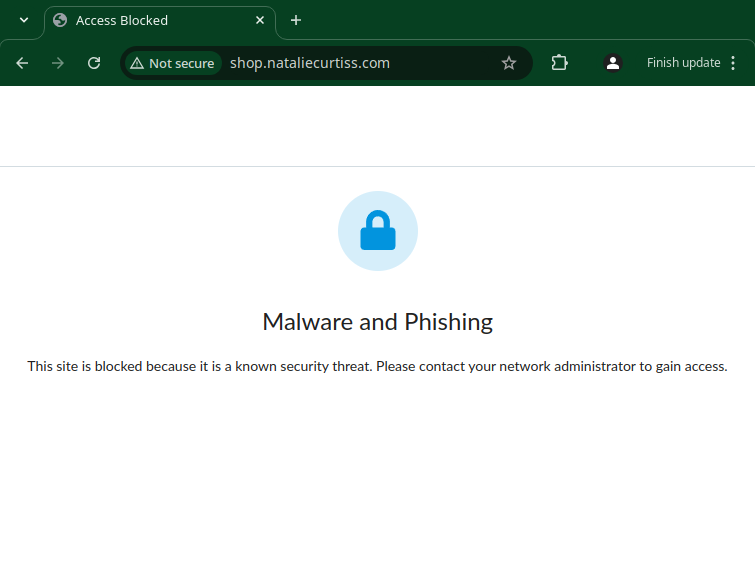
    That's about as generic as they come and there's no indication of who is showing it to us and why. For the record, I do not use Comcast's DNS resolvers. Until today there has been no "real" reason for this, but Comcast specifically has a long and proud history of DNS fuckery going back to the 90s. After today I'll be taking additional steps to ensure my DNS queries aren't being "improved" by my ISP.

    Looking at the source of this page though, the only indication of whose fault this is a reference to an "xfinity" font family:

    body {
    font-family: Xfinity, Open Sans, Arial, sans-serif;
    font-size: 14px;
    line-height: 22px;
    font-weight: 300;
    color: #212121;
    display: flex;
    flex-direction: column;
    }

    Clearly at some point, Comcast is yoinking the plaintext DNS reply I'm getting from my upstream resolvers and replacing it, directing me to their "Malware and Phishing" page.

    This is easily shown with nslookup. If I do a lookup against the public DNS resolver at 4.2.2.2 for www.nataliecurtiss.com from my home workstation I get 104.225.8.28(29), but if I do the same request against the same public resolver from off-site, I get the correct CNAME record for natalie-curtiss.squarespace.com.

    Home

    > server 4.2.2.2
    Default server: 4.2.2.2
    Address: 4.2.2.2#53
    > www.nataliecurtiss.com
    Server: 4.2.2.2
    Address: 4.2.2.2#53

    Non-authoritative answer:
    Name: www.nataliecurtiss.com
    Address: 104.225.8.29
    Name: www.nataliecurtiss.com
    Address: 104.225.8.28
    Name: www.nataliecurtiss.com
    Address: 2607:fc50:3000:2::1b
    Name: www.nataliecurtiss.com
    Address: 2607:fc50:3000:2::55

    Off-site

    > server 4.2.2.2
    Default server: 4.2.2.2
    Address: 4.2.2.2#53
    > www.nataliecurtiss.com
    Server: 4.2.2.2
    Address: 4.2.2.2#53

    Non-authoritative answer:
    www.nataliecurtiss.com canonical name = natalie-curtiss.squarespace.com.
    Name: natalie-curtiss.squarespace.com
    Address: 198.49.23.176
    Name: natalie-curtiss.squarespace.com
    Address: 198.49.23.177
    Name: natalie-curtiss.squarespace.com
    Address: 198.185.159.177
    Name: natalie-curtiss.squarespace.com
    Address: 198.185.159.176

    104.225.8.29 is a Nominum IP that doesn't tell me a whole lot about who's paying them and why exactly but at least identifies the specific flavor of DNS fuckery that's happening here.

    So I started searching around for what people do about such blocked page messages as a site admin. The simplest thing is to visit this XFinity page, select "I can't reach a website I want to go to" and request the site be unblocked. There is no positive feedback here. You get an automated "we're gonna look into and see about unblocking you, bye forever!" response. I put as much context in my More Information box as I could, that I am the owner of these domains, if there's something wrong that's causing them to be blocked I want to know so I can fix it.

    I did this twice a couple of weeks apart, and as expected it had no impact. If Comcast Business had a way to open a case without sitting on hold or dealing with an in-browser chat (bot?) I would have taken that route at this point.

    Only the other day did it occur to me to have other Comcast/XFinity customers test this. I had one home user and one business user test and both were able to hit the site just fine. So is it a volume thing? We hit the site a lot from here, so it trips some kind of threshold? WTAF?

    Today I remembered that a couple of weeks ago when the whole "Mozilla Terms of Service" issue blew up everyone and their brother was offering alternate browser suggestions. I recall someone suggested Zen at www.zen-browser.app, and recall getting the Malware and Phishing page for that. At the time I was like "hey nice security Zen, you get a nanosecond of traction and immediately get hacked into a malware farm?". I had forgotten this by the time Natalie complained about access to nataliecurtiss.com

    Today is when it all clicked in my head. Oh, hey Comcast started sending me "SecurityEdge Activity Reports" in the mail some time ago. Wonder what's up with that. So I hit my account and logged into the SecurityEdge site for the first time. It looks a whole lot like a scaled down consumery version of Cisco Umbrella. You can select various "Category" blocks and there's a "Malware and Phishing" slider that is "ON" and ghosted so you can't turn it "OFF". You can disable SecurityEdge globally, which of course is what I've done.

    Looking at my stats, over the past 30 days the Dashboard claims to have blocked an impressive 692 Things:
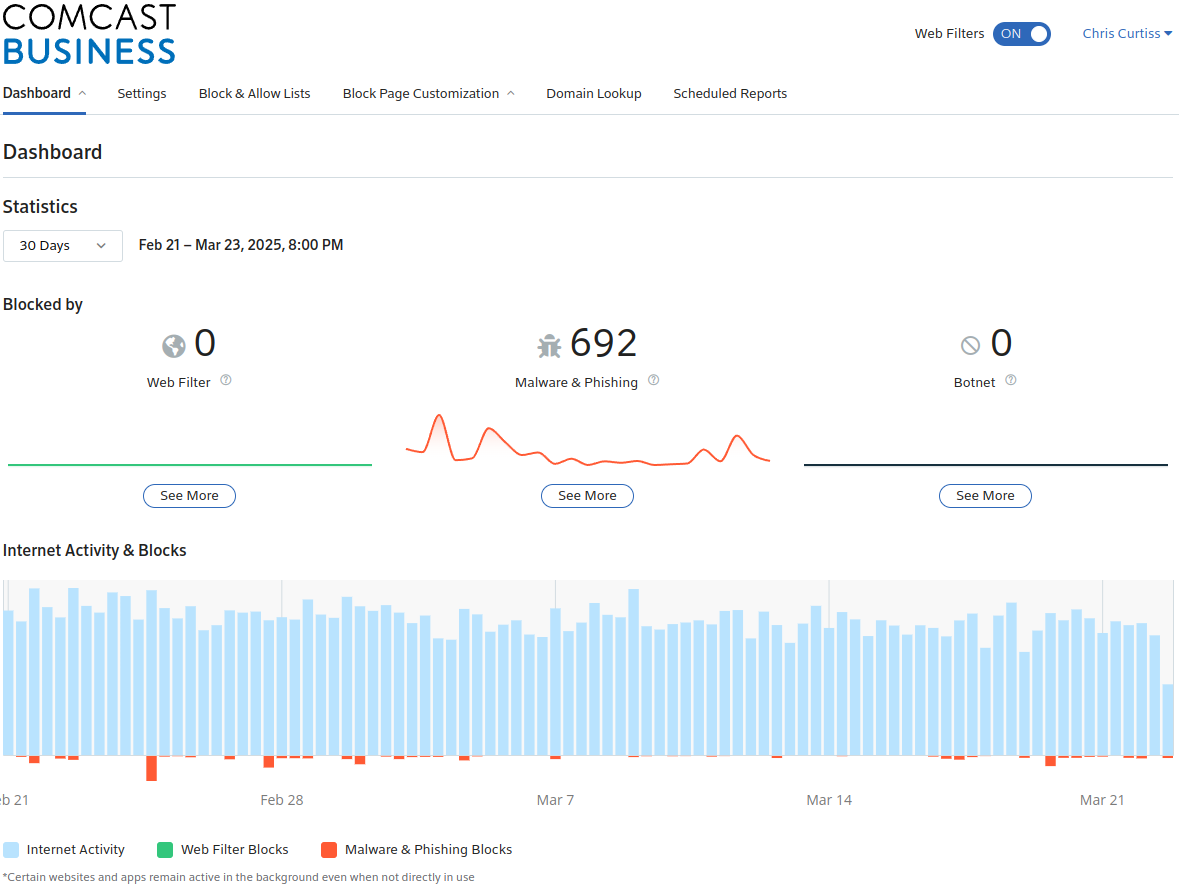
    However drilling in and downloading the full csv output of all the blocks, there are only 196 rows (195 results and a header row). So whatever, I can't account for 692. There's no multiplier column that I can see, identical requests are just repeated as multiple rows. Anyway they break down like this. Here are the results for things where I know 100% are traffic I intentionally generated:

    1 www.freeroms.com
    7 nataliecurtiss.com
    9 comms-sl-events.squarespace.info
    10 yestonstore.com
    16 eviltracker.net
    22 shop.nataliecurtiss.com
    25 zen-browser.app
    69 www.nataliecurtiss.com

    That's 160 of the 195 total, I removed two other heavy hitters at 16 and 20 hits each since I'm still investigating them. There are only three which either aren't related to my wife's site or the aforementioned Zen browser anomaly.

  • FreeRoms, because hell yeah free roms
  • Eviltracker.net - used by EFF to check exactly this kind of bullshit. In this case I did a run of their browser privacy test at Cover Your Tracks which I now see was a compromised test in that Comcast blocked some of their test suite.
  • yestonstore.com - Because just look at it

    The remaining 5 results (I'd say 25, realistically) are pretty spammy looking for sure. So in the last 30 days Comcast has saved me 25 hits to domains that I don't recognize, and which were likely loading tracker pixels on sites I did visit, and "saved me from myself" 160 times.

    "So what the fuck can I do about it"?

    Well nothing. There's no visible mechanism to request any feedback as to /why/ something is in their block list. Either as a user, which is bad, or more importantly as someone who runs the goddamn site. On the very network the service claims to be trying to protect.

    I would love to see a few things:

  • In the SecurityEdge product, have a link to request a review, or at least "Show me why this site is blocked".
  • Externally, for a site admin who doesn't also happen to be a customer, and who doesn't even more coincidentlly host that site on the Comcast Business network, provide some entry point for them to find out what is wrong with their site so they can either remedy that or otherwise explain the issue and get their shit delisted.
  • And I'm really shooting for the moon - A mechanism for a user of your Business product to open a ticket and receive a ticket number.
  • Make your goddamn site work in Firefox for the love of...

    I'd say "A link on the block page itself" would be a fantastic start. Something identifying it as having been served by Comcast/XFinity would be equally fantastic. I understand it can be branded by the customer, but the default should at least identify what it's doing. If a customer chooses to "remove all Comcast branding", preferably via a checkbox in the "Customize the Block Page" UI. Making it a choice on the customization page ensures a level of understanding on the customer's part that this is something they signed up for and maintain.

    I'm being very careful about saying that this was just "enabled" for me by default. I'm not ignoring the fact that I could have clicked some button one day in the Comcast Business portal and just said "yeah yeah securityedge whatever" but prior to today I'd never logged into the SecurityEdge portal and "configured" it. I don't /think/ I'm being charged extra for SecurityEdge, but I don't see why that wouldn't be the case. I mean, ISPs give away third-party enterprise malware prevention support for free all the fuckin' time right?

    Every enterprise ISP I use except Comcast offers such a feature in their dashboard via your choice of "open a case" button or an email address. I don't want to "chat with support". I don't want to call in and speak to a human being. I can explain my technical issue very well in email or the constraints of a 4000 character limit text dialog. Had I that opportunity a month ago, it would have boiled down to:

    I can't reach multiple sites I own, one of which is hosted on the Comcast Business network 6 feet away from me. Something is interfering with my DNS lookups and returning a result that takes me to some "malware and phishing" page. Here is nslookup output:

    ... copy/paste from above ...

    I have three questions:
    - Why is this happening
    - How do I make it stop
    - How do I as the administrator of these sites fix whatever is making you think they're hosting phishing and malware requests so other users aren't being blocked from my sites

    As to the root cause, since this fixes it for me, but other people will likely still be blocked... Why is Natalie's site blocked for Malware and Phishing? If I had to guess it's because of this. 12 years ago Natalie's site was one of a couple hundred target domains in a malware attack. What they were doing was spamming cookies at massive scale, presumably trying to match the session cookie of an admin of the site.

    Because of that attack, I've seen her site blocked for such things before, with that malware being cited as the "reason". Of course the script responsible for adding her domain to the list doesn't understand the nuance of the matter that her domain was the "victim" of the malware and not the "generator" of the malware. It just sees "malware + domain = block". I'm giving humanity a pass here that I really shouldn't. Human beings are just this stupid as well.

  • Pages

    Subscribe to RSS - Work