Cisco

xrayspx's picture

Checkmate 19" 4:3 Retro IPS Monitor

Music: 

The Disposable Heroes of Hiphoprisy - Television, The Drug of the Nation

For a year now I've had a Checkmate 19" 4:3 aspect ratio monitor, and I want to show how that's getting used. The reason I kind of sat on it for so long is that I got frustrated, then depressed and spiraling, and finally decided to fix things and spend myself out of my problems. For Health! And here we are, fully working solution, I'm super happy.

I've seen these monitors start showing up in videos from folks like Nostalgia Nerd and Modern Vintage Gamer, but I haven't seen them really exploring it so I want to share some of my favorite use cases. And with my upcoming sabbatical I'm planning on doing a lot of projects involving the machines you'll see here so I wanted to kind of intro everything before I get started on those.

So let's go check it out!
(Caveats: I am not comfortable making videos, and I'm not good at it. I didn't edit out many of my "behind the scenes" bumbling because if I have to figure it out, you have to watch me figure it out! Hopefully you find my awkward bumbling "charming")


TL;DW;

The Checkmate is not just a monitor, it's also an integrated electronics project box, 2u mini-rack and hacking platform.

Basically as I said I ran into one or two semi-issues. The 15Khz horizontal scan rate thing on the VGA port was a real bummer and sent me down a hole, but the OSSC Pro worked out great to help solve that, even though I really don't understand that thing at all. It looked like shit for like a month and just through random button-mashing I got it to work great for both mono and color on the ST. Thanks to CTRL-ALT-Rees for the in-depth review of the OSSC vs RetroTink video specific to the Atari ST platform. If I ever get up the courage to do a factory reset on the OSSC I'll try and document exactly what settings need to be twiddled to make this work in my case.

Thanks again also to BackOfficeShow for leading me to the realization that converting ST to VGA was all just a simple passive "hook the wires to the other wires" process which inspired me to do my Monitor Master hack!

Future projects and other use cases

  • I do want to see if I can hack a GoTek in there to use as a drive on my ST with the rotary encoder in the monitor. That would be about the slickest thing imaginable. I'll probably get a GoTek with an encoder and try to remove that one and use the monitor one instead.
  • There are 12VDC headers on the backplane board. Can I wangle one to a barrel jack and mount an 8 port switch in here? I have a couple of 12v@1A Netgear GS108T switches and I'd love to see if I can pull that much power and have a little self-contained network. This is pointless. The Pi in there is just on WiFi, but I kinda want to see.
  • My most recent job ships cases and cases of hardware to healthcare trade shows. Much of the network hardware for the booth and even small PCs for running demos could easily be securely fitted into a Checkmate with the HDMI out going off to a big TV.
  • Portable industrial control and automation platform as a self contained control station again with several SBCs and integrated network switching
  • I'm a network and datacenter-ops guy who naturally looks at everything through that lens. If I were building a crash cart or repair workbench I'd love these just to fill with low power SBCs (Pi 3 works great) and switching for a portable KVM, isolation network and test suite.

    While they're not "cheap" for a consumer product, thinking in terms of even small-scale datacenter hardware they're an absolute /steal/.

    Other Quirks

    I did run into a race issue with the Raspberry Pi as well. I think it takes a bit for the monitor to be fully up and ready to receive video as it starts up. At first I thought it might have been an inrush current type thing, but I think it's just that the monitor isn't "up" yet when the Pi starts shooting out video.

    When I'd boot the monitor cold there would be no video until I unplugged and re-plugged power to the Pi. To fix that I added a 10000ms delay to /boot/config.txt and it works great:

    boot_delay_ms=10000

    To give you a sense of the depth of my personal psychosis, the other issue I kind of have is a ridiculous future-proofing one that is bonkers to even be worried about. There are 6 HDMI inputs on this monitor, but only the main one is directly addressable through the front-panel buttons. Using the front panel, you can switch between HDMI-1 and one of HDMI-2 through HDMI-6. To select between HDMI-2 -> 6 you must use the remote. You can kind of see me do this in the video.

    From what I can figure out this of course makes total sense. The UI firmware of the panel, like the off-the-shelf stuff that is the same as the EYOYO monitors, knows nothing about the riser card with all those extra ports on it right? The firmware knows about two ports. The external HDMI-1, and an Internal HDMI that the mezzanine card plugs into, and can select between them. The remote therefore isn't interacting with that COTS firmware to do this, but instead it's controlling the mezzanine card to switch the input among the other 5 ports, which is a very neat way to work around that. I mean obviously the firmware can select the riser card ports, because that's where the composite inputs live as well. If I had to guess it "only" had code to handle two HDMI inputs, so this workaround was implemented.

    That's obviously a totally rational way to do this, and really the only way you probably can. It's awesome. My "planner" brain is just saying well, what about in 30 years when that remote is dead or lost. How do I select those ports?

    For all I know I can control that mezzanine card totally in code over GPIO from a Raspberry Pi, or serial, or LIRC (which this probably is). Who knows. That's Future Guy's problem. I haven't even dug into that, but I certainly intend to! I want to see just how far I can push this.

    Greetz and Links

    Checkmate1500plus.com for making an excellent project out of total engineering passion. Excellent work all around to Steve and Appy and the rest of the team!

    BackOfficeShow.com for showing how easy it can be to convert ST to VGA and switch between mono and color.

    CTRL-ALT-Rees.com for his in-depth OSSC testing and demonstration.

  • xrayspx's picture

    A Quick Office Tour

    Music: 

    Catherine Wheel - Pain

    I made a quick tour video for an audience of about four. Here's a brief look at the basic stuff in my office, much of which I will do better quality videos about soon. Maybe like a monthly VAST/SPACE meeting? I dunno.

    Enjoy the 1992 aesthetic. Pretend it's a VHS-C tape or something you found at Goodwill.

    Update: I didn't notice the screensaver during the whole desk part until uploading just now and it's my favorite thing ever.


    xrayspx's picture

    Project Planning

    Music: 

    I'm trying to lay out some projects that I want to do "when I have the time". I'm considering streaming / recording these as I go if anyone wants to see them and/or help live. I'm at least going to document all of this so it's available to anyone who needs it.

    I'm going to update this page as more things come up and I start completing tasks.

    • Pimp my Atari ST
      • Get video working. I have an SC1224 which isn't /super/ reliable. I have a Checkpoint monitor that I'm trying to get working for color + mono. I need to get that thing figured out and order whatever I need to make it go
      • Get a BlueSCSI working as a novelty oversized hard drive with tons of partitions and everything on there. This will involve removing the RIFA caps and getting Len's ICD enclosure working and learning how to install drivers and stuff.
      • Get my ST talking to Linux machines over serial. This could either be the Pi inside the CheckPoint monitor, or ideally hooked up through the Avocent serial console switch so I could address other ports
      • Use the serial terminal to manage software transfers from my PC to ST eliminating using aging physical floppy disks and drives or new things like GoTek
      • Use this method to make images of Len's stuff and transfer to the PC. I think that will be the easiest way to archive these disks


    • NeXT Machine
      • Buy the replacement modern SoundBox card to get VGA output and eliminate the aging CRT
      • Build the AdaFruit project to use the NeXT non-ADB keyboard on a PC with USB
      • Use that knowledge to gauge how hard it might be to go the other direction? Using USB stuff on NeXT would be way more useful
      • Try to get the service manual for that printer or an equivalent Canon model


    • MiSTer Cabinet
      • Remove that front door. I keep banging my knees on this idiot door
      • While the cabinet is apart, extend all the ports from the TV inside with like pigtail connectors including power (C14 -> C15), HDMI and anything else like RF and stuff to hook up Ataris
    xrayspx's picture

    My Life Is Going To Suck Without Net Neutrality

    Music: 

    There are so many things I do which are likely to suffer with Net Neutrality's loss.

    I run my own mail, web and cloud sharing services on a VPS that I maintain. Owncloud syncs all my devices, I use IMAP and webmail. I also run lots of "consumer" stuff for myself. I own 2500 CDs which I've ripped and share for my own personal use. I have playlists. I can connect with DAAP from my phone, and listen to my own CD collection, music I have paid for, Spotify style. I know people are saying "Spotify will work just fine", but what if I don't want to use Spotify?

    This is all encrypted, personal connections. Nothing illegal is happening here. I'm not filesharing or streaming Torrents or any other grey-area services. It's just all my personal stuff, owned and manually copied myself, sharing to myself. No one gets ripped off here.

    I can plug my Amazon Fire stick or Raspberry Pi into any TV and use Kodi to stream my own MP3s or movies, etc. I can use it to watch Amazon Prime or Netflix as well. Kodi also has a wealth of plugins to watch content from sources such as the PBS website. We all can watch Nova, or Julia Child, or even Antiques Roadshow over the Internet, for free, legally. This may all suffer when backbone providers and local ISPs can both decide which packets have priority over other traffic. PBS could be QOS'd out of the budgets of millions.

    (Note *)I don't own a Nest or any other IOT garbage, but I have toyed with the idea of building my own, running on infrastructure I build. I don't want Google to know what temperature my house is right now. And I don't want some mass hack of 500 Million Nest users or idiot IOT Lightbulbs to let some Romanian turn my furnace off in the middle of February either.

    So yeah, losing Net Neutrality could effectively disable all of this. Small hosts like me could be QoS'd off of the Internet entirely, unless we pay extra /at both ends/. Pay my hosting provider to pay their backbone providers to QoS my address at a decent speed. Then pay my consumer ISP to QoS my traffic so I can reach "The Good Internet", like they have do in Portugal.

    This is going to cut my lifeline to my own data, hosted by me on my own machines. Am I going to have to pay an additional "Get Decent Internet Access Beyond Google, Spotify, Facebook and Twitter" fee to the Hampton Inn just so we don't get QoS'd away from our own stuff? It's bad enough that the individual hotel can effectively do this already today, but the hotels are at least limited by the fact that they're in competition with each other and if they have ridiculously shitty Internet that you can't check your mail over, well people would notice that. Backbone providers pretty much have no such direct consumer accountability. No one's going to say "well, fuck that I'm not going to route over AT&T anymore", they might say "Hilton has shitty Internet, I'm going to Marriott".

    Some of the most demoralizing part of this is that the rule-makers just don't get it. I already know they don't care, but former FCC Chair Michael Powell's statement, which boils down to "You can still use Facebook, (Amazon) Alexa, Google and Instagram, just like you can now" is missing the point either deliberately or purposefully. That most "consumers" will be fine isn't the point. The point is that everyone be equal, and all traffic be routed equally.

    * The risk to my information is proportional to the value an attacker places on the information. Could a state actor target my email server and read my mail? Yeah, the Equation Group or Fancy Bear or some Eastern European ID theft ring could probably exploit some flaw in whatever software serves my VPS, or flat out order the ISP to give them access to my stuff, but why? What does the NSA gain by ransacking my mail server? Not much. How about criminal attackers? However they /would/ expose 1.5 Billion Yahoo accounts all at once, and have that entire corpus of mail to search against, plus passwords they could use to try and attack everyone's bank account all at once.

    Opening Message

    Hello and Welcome!

    Over the course of my time as an Admin I've done a lot of Google searches and writeen a lot of code that has been very helpful to me in my work. I will be posting things here that hopefully will help you in your quest to master some of these technologies (Or simply stand on the shoulders of midgets).

    I by no means consider myself a Perl or LDAP expert. It has been a "Learn as you go" ordeal. No formal training, just get things done on an as-needed basis.

    I assume that you have a basic knowledge of PERL and LDAP.

    Enjoy!

    -Sean

    Tags:
    xrayspx's picture

    OUCH!

    [music | The Pixies - Break My Body]

    If you'll remember back a few months, I lost a toenail after catching a drunken pit guy at Rev. Horton Heat. In today's installment, it's a fingernail.

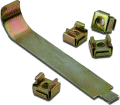
    Today I was putting some switches in a rack, and was putting in cage nuts the un-safe way. With a screwdriver instead of a cage nut tool. Here's what the aftermath of that can look like unless you're more careful than I am.

    I'm putting pictures behind here for people who are queasy:

    xrayspx's picture

    CSSManager

    The CSSManager is meant to allow access to certain functions of the Cisco CSS series load-balancers to less trusted (non network-engineer) staff without opening the CSS up to too much risk of misconfiguration. Currently it allows web users to suspend and activate Services in bulk quickly and safely. There are also value-added features such as "locking" servers so someone can't accidently activate a server that was suspended for a reason, comments are also useful, especially when used in conjunction with CSSPump to give context to a suspended or down server.

    xrayspx's picture

    Tools and Hacky Stuff

    Here are some tools I've written which could be of use to other folks. It's going to be mostly Cisco related, some of which is still being formatted before I upload it, more to come.

    CSSManager is a tool to simplify suspending and activating services in a Cisco CSS load balancer. It adds a couple of features like the ability to "lock out" a server and to add comments to a suspended machine to give context for its suspension. More features to come.

    xrayspx's picture

    Cisco CSS Toy

    [music | Bauhaus - Dark Entries (Live)]

    This is the first of a few tools I have to release in the coming couple of weeks, mainly involving Cisco's CSS product. The purpose of me writing them is that Cisco's web interface to the CSS is both a terrible user experience and has shown itself to be vulnerable to trivial attacks in the past (in a security sense). I don't want to run the web gui on my CSS's, and most of our admins were terrified of the command line. So I wrote a bunch of tools to help do their jobs, without the possibility of screwing up the load balancers.

    Subscribe to RSS - Cisco